> ## Documentation Index
> Fetch the complete documentation index at: https://docs.spline.design/llms.txt
> Use this file to discover all available pages before exploring further.
# FAQ
## 📸 What types of content can I export with Spline?
You can export the content of your scene by pressing "Export" on the Toolbar.
#### 🥕 3D Content
* For the **Web**
* [Exporting as Public URLs](/exporting-your-scene/web/exporting-as-public-ur-ls) - A URL hosted on Spline servers *([my.spline.design](http://my.spline.design)...)*
* [Exporting as Spline Viewer](/exporting-your-scene/web/exporting-as-spline-viewer) - Embed Spline 3D content with a code snippet.
* [Exporting as Code](/exporting-your-scene/web/exporting-as-code) - Export code to make more complex integrations and use Spline API.
* For **Apple Platforms**
* [Native 3D Embeds for iOS](/exporting-your-scene/apple-platform/native-3d-embeds-for-i-os) - Embed your scenes with Swift Native 3D for Apple Platforms.
* [iOS App Generation](/exporting-your-scene/apple-platform/i-os-app-generation) - Generate pre-built Xcode Projects with App Generation.
* Export for Vision Pro and preview your 3D content with [Spline Mirror for visionOS](/exporting-your-scene/apple-platform/spline-mirror-for-vision-os).
* For **Android Platforms**
* [Native 3D Embeds for Android](/exporting-your-scene/android/native-3d-embeds-for-android) - Embed your scenes with Kotlin Native 3D for Android.
* [Android Package (APK)](/exporting-your-scene/android/android-package-apk) - Export pre-built Android Packages (APK).
* [Android App Bundles (AAB)](/exporting-your-scene/android/android-app-bundles-aab) - Export pre-built Android App Bundles (AAB).
* 3D Formats
* GLTF (.gltf)
* GLB (.glb)
* STL (3D Printing)
* USDZ (iOS AR)
* Spline Files (Files with ".spline" for saving your scenes locally).
#### 🖼 Image
* PNG
* JPG
#### 🎥 Video
* WebM
* Mp4
* Image Sequence
## 🖼 What types of content can I import with Spline?
You can import content to your scene by dragging & dropping the file into the Viewport or with the Open/Import shortcut \[⌘ O].
Here is a list of the file formats you can import into Spline. Additional export types will come in the future.
#### 🥕 3D Content
* OBJ
* FBX (supports animation and rigs)
* [Import Animated Objects](/importing-content/import-animated-objects)
* STL
* GLTF (as .gltf)
* GLB (as .glb)
* Spline Files (.spline)
#### 🖼 Images
* PNG
* JPG
#### 🖋️ Vector
* SVG (partial support)
#### 🎥 Video
* MP4
#### 🔊 Sound
* MP3
* WAV
#### 🌳 Gaussian Splats
* [3D Gaussian Splatting](/designing-in-3-d/3d-gaussian-splatting)
## 🍭 Can Spline be integrated with other tools?
Yes, if you export your scene for the Web as a **Public URL** ([Exporting as Public URLs](/exporting-your-scene/web/exporting-as-public-ur-ls)), you can use the links or embed codes to embed it on platforms like Notion, Framer, Webflow, etc.
It’s also possible to integrate with the **Spline Viewer** ([Exporting as Spline Viewer](/exporting-your-scene/web/exporting-as-spline-viewer)) code snippet, use **Code Exports** ([Exporting as Code](/exporting-your-scene/web/exporting-as-code)) or the **Native Webflow Support** ([Integrating with Webflow](/integrations/integrating-with-webflow)).
You can export [Native 3D Embeds for iOS](/exporting-your-scene/apple-platform/native-3d-embeds-for-i-os) too which supports all Apple platforms iOS, iPadOS, macOS, and visionOS.
You can export [Native 3D Embeds for Android](/exporting-your-scene/android/native-3d-embeds-for-android) which supports all Android devices including Phones, Tablets, Smart TV, and more.
## 💻 What are the technical requirements to run Spline?
We recommend using the latest version of your OS to run Spline. 3D is a relatively new technology for browsers, and it requires more CPU/GPU processing than traditional 2D design tools.
If you are using a Macbook Pro with a discreet GPU card, a common suggestion is to enable high-performance settings by defaults.
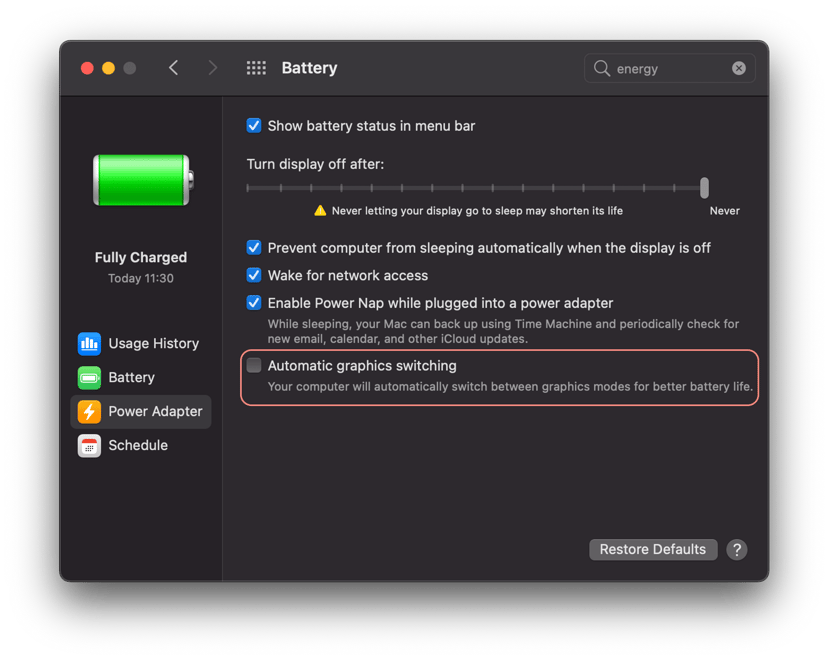
*M1 Macbooks don't require this setting.*
## 💳 How does the pricing work?
To learn more about Spline’s pricing[ visit the pricing page](https://spline.design/pricing).