> ## Documentation Index
> Fetch the complete documentation index at: https://docs.spline.design/llms.txt
> Use this file to discover all available pages before exploring further.
# Exporting as GTLF/GLB
GLTF and GLB are open-source file formats for 3D scenes and models, used in games, web apps, AR, VR, and more.
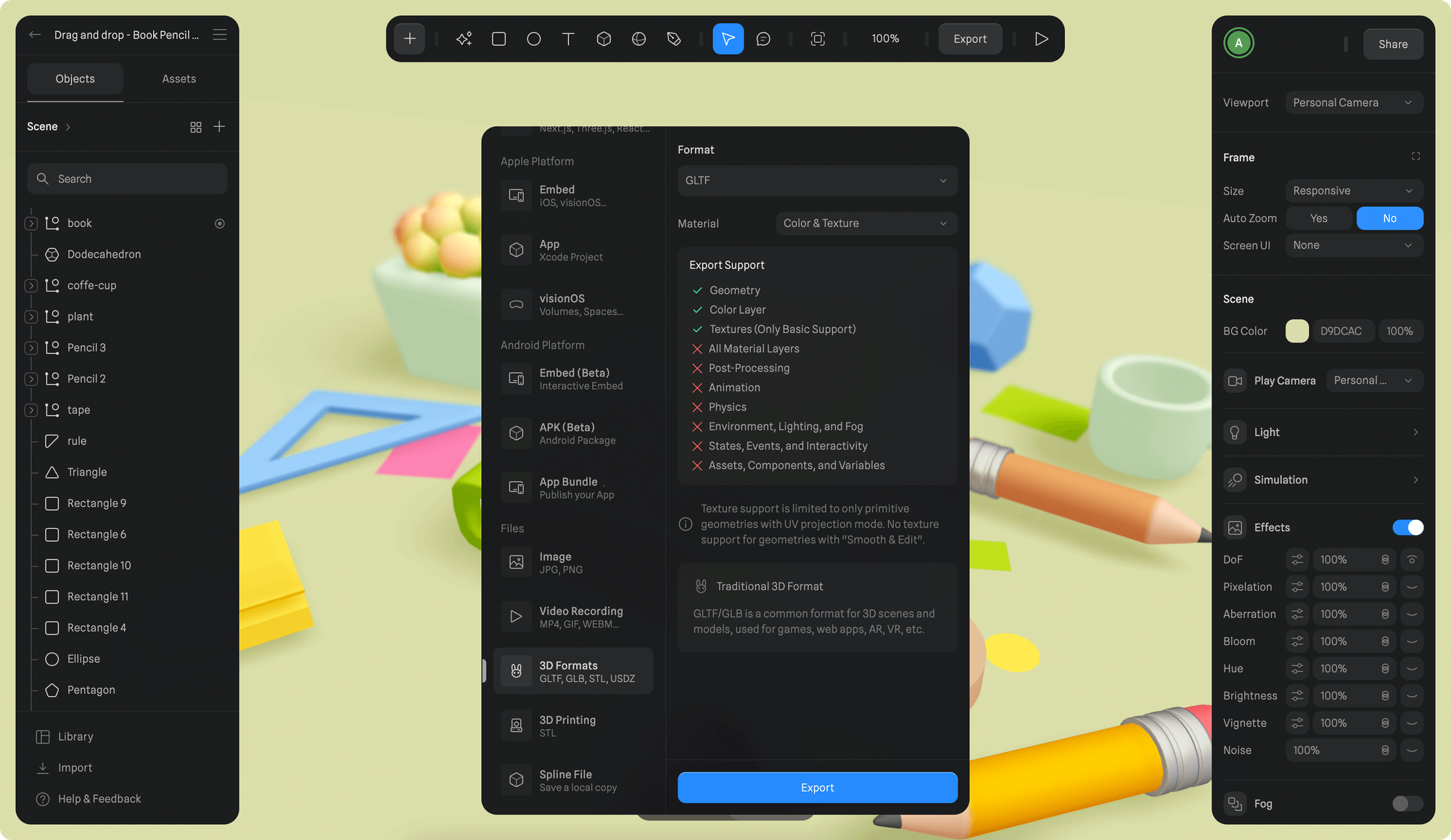 1. Once you're happy with your scene, press the Export button on the toolbar.
2. Scroll down to select "3D Formats" under *Files* section from the export sidebar.
3. Choose either “GLTF” or “GLB” from the *Format* dropdown.
4. Choose “Default Color (Grey)” or “Color & Texture” from *Material* dropdown and click Export.
#### Material types
Following material types can be selected for export:
* **Default Color (Grey)** → Exports only the scene geometry with default grey color material.
* **Color & Texture** → Exports the scene geometry with material layers (Color layer), including textures. (⚡ Paid feature, included in **Professional** and **Team** subscriptions.)
Some material layers are not fully supported by the GLTF & GLB format. Texture support is limited to only primitive geometries with UV projection mode. No texture support for geometries with “Smooth & Edit”.
#### ✅ Supported features
* Geometry
* Color Layer
* Textures (Only Basic Support)
#### ❌ Not supported features
* All Material Layers
* Post-Processing
* Animation
* Physics
* Environment, Lighting, and Fog
* States, Events, and Interactivity
* Assets, Components, and Variables
1. Once you're happy with your scene, press the Export button on the toolbar.
2. Scroll down to select "3D Formats" under *Files* section from the export sidebar.
3. Choose either “GLTF” or “GLB” from the *Format* dropdown.
4. Choose “Default Color (Grey)” or “Color & Texture” from *Material* dropdown and click Export.
#### Material types
Following material types can be selected for export:
* **Default Color (Grey)** → Exports only the scene geometry with default grey color material.
* **Color & Texture** → Exports the scene geometry with material layers (Color layer), including textures. (⚡ Paid feature, included in **Professional** and **Team** subscriptions.)
Some material layers are not fully supported by the GLTF & GLB format. Texture support is limited to only primitive geometries with UV projection mode. No texture support for geometries with “Smooth & Edit”.
#### ✅ Supported features
* Geometry
* Color Layer
* Textures (Only Basic Support)
#### ❌ Not supported features
* All Material Layers
* Post-Processing
* Animation
* Physics
* Environment, Lighting, and Fog
* States, Events, and Interactivity
* Assets, Components, and Variables