> ## Documentation Index
> Fetch the complete documentation index at: https://docs.spline.design/llms.txt
> Use this file to discover all available pages before exploring further.
# Conditional Action
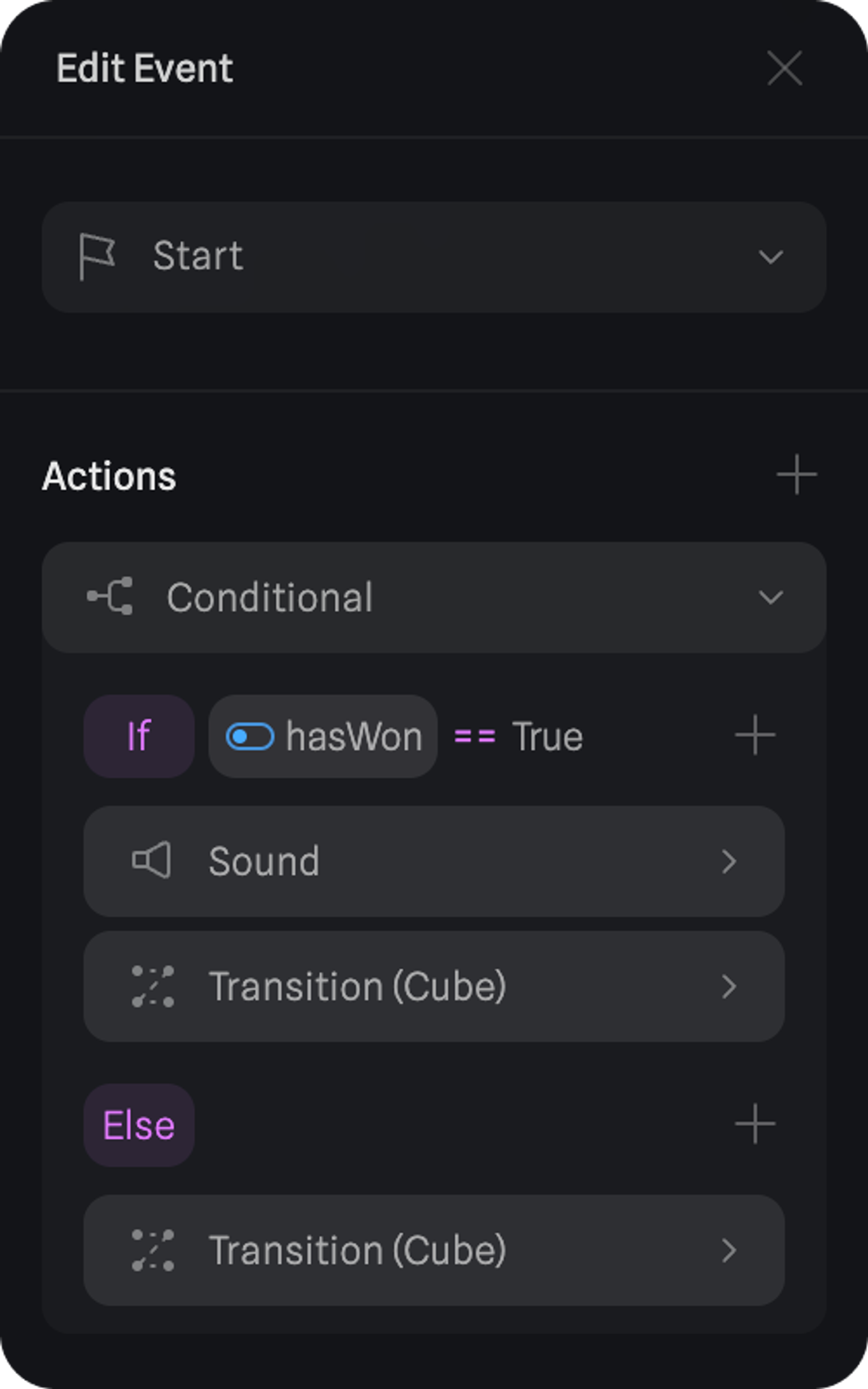
The Conditional Action allows you to create conditional logic on your scene with the help of variables and logic operators.
Learn more about [Variables](/interaction-states-events-and-actions/variables) to better understand how to use them in the Conditional Action.
## How to use a Conditional Action
Under an Event, you can use a Conditional Action to wrap a group of actions that will only be triggered if the condition set is met.
 ## Conditional Action properties
### IF - Condition
Create an expression that will be the condition for actions to be triggered.
The following variable types can be used:
| Variable | Defined by | Usage |
| -------------------------- | ------------------------------------------------------------------------------------------------------------------------------------------------------------ | ------------------------------------------------------------------------------------------------------------------------------------------------------------- |
| 🤹 Variables | Number, String, Boolean, Timers, Counter or Random | Variables can store values that are reusable. For detailed explanation read the [Variables](https://docs.spline.design/d17e9b49f5284f19b309fce92af0d011) doc. |
| ℹ️ Object Property | Object’s position, rotation, or scale (X, Y, Z), or it’s width, height and depth as a number, e.g.: `100` | Capture object property changes, and save them as variables to create advanced interactions. |
| 🖱️ Mouse Position (2D) | The position of the mouse on the screen is defined by X and Y as numbers. | Animate or manipulate objects based on the mouse position |
| 💥 Mouse Hit Position (3D) | The position of the mouse hitting an object in 3D space, as Position X, Y, or Z of the hit location, or the Position X, Y, and Z of the object that was hit. | Create interactions based on specific hit positions, e.g.: visualize hit in 3D space. |
The following operators can be used in expressions:
| Symbol | Operator |
| ------- | ---------------------------------- |
| `+` | Add |
| `-` | Subtract |
| `*` | Multiply |
| `/` | Divide |
| `(` `)` | Group calculations with parenthesi |
**Logical Operators**: Used to combine or modify boolean logic statements, where the result is either true or false.
| Symbol | Operator |
| ------ | -------- |
| `and` | And |
| `or` | Or |
| `!` | Not |
**Comparison Operators**: Used to compare two values, expressions, or variables.
| Symbol | Operator |
| ------ | ------------------------ |
| `==` | Equal to |
| `!=` | Not equal to |
| `>` | Greater than |
| `<` | Less than |
| `>=` | Greater than or equal to |
| `<=` | Less than or equal to |
**Boolean Outcomes:** Represent the two possible outcomes of logical and comparison operations.
| Symbol | Operator |
| ------ | -------- |
| ✅ | True |
| ❌ | False |
### ELSE
Actions added under `Else` will be triggered if the condition set on `If` is not met.
## Conditional Action properties
### IF - Condition
Create an expression that will be the condition for actions to be triggered.
The following variable types can be used:
| Variable | Defined by | Usage |
| -------------------------- | ------------------------------------------------------------------------------------------------------------------------------------------------------------ | ------------------------------------------------------------------------------------------------------------------------------------------------------------- |
| 🤹 Variables | Number, String, Boolean, Timers, Counter or Random | Variables can store values that are reusable. For detailed explanation read the [Variables](https://docs.spline.design/d17e9b49f5284f19b309fce92af0d011) doc. |
| ℹ️ Object Property | Object’s position, rotation, or scale (X, Y, Z), or it’s width, height and depth as a number, e.g.: `100` | Capture object property changes, and save them as variables to create advanced interactions. |
| 🖱️ Mouse Position (2D) | The position of the mouse on the screen is defined by X and Y as numbers. | Animate or manipulate objects based on the mouse position |
| 💥 Mouse Hit Position (3D) | The position of the mouse hitting an object in 3D space, as Position X, Y, or Z of the hit location, or the Position X, Y, and Z of the object that was hit. | Create interactions based on specific hit positions, e.g.: visualize hit in 3D space. |
The following operators can be used in expressions:
| Symbol | Operator |
| ------- | ---------------------------------- |
| `+` | Add |
| `-` | Subtract |
| `*` | Multiply |
| `/` | Divide |
| `(` `)` | Group calculations with parenthesi |
**Logical Operators**: Used to combine or modify boolean logic statements, where the result is either true or false.
| Symbol | Operator |
| ------ | -------- |
| `and` | And |
| `or` | Or |
| `!` | Not |
**Comparison Operators**: Used to compare two values, expressions, or variables.
| Symbol | Operator |
| ------ | ------------------------ |
| `==` | Equal to |
| `!=` | Not equal to |
| `>` | Greater than |
| `<` | Less than |
| `>=` | Greater than or equal to |
| `<=` | Less than or equal to |
**Boolean Outcomes:** Represent the two possible outcomes of logical and comparison operations.
| Symbol | Operator |
| ------ | -------- |
| ✅ | True |
| ❌ | False |
### ELSE
Actions added under `Else` will be triggered if the condition set on `If` is not met.