> ## Documentation Index
> Fetch the complete documentation index at: https://docs.spline.design/llms.txt
> Use this file to discover all available pages before exploring further.
# Key Press Event
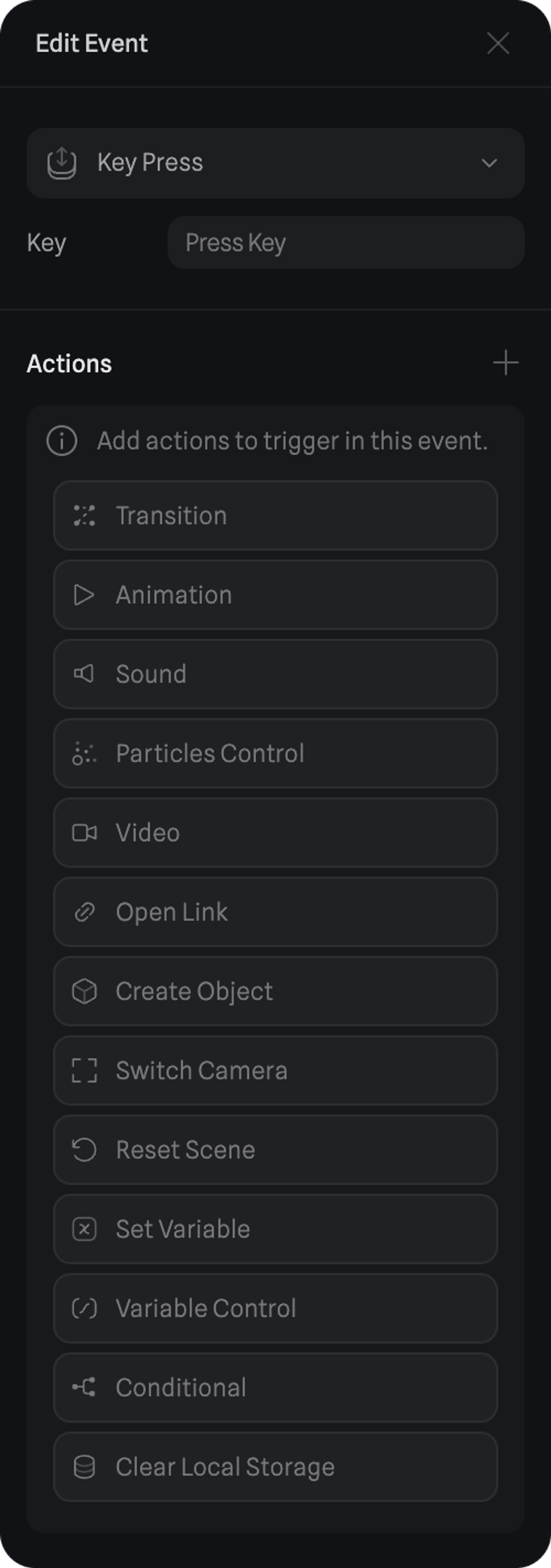
The Key Events require the user to perform an action with the keyboard to trigger all the actions inside.
A Key Press Event will trigger the actions while the keyboard key is pressed. Once the keyboard key is released, the actions will reverse back to the original state.
#### Key Input
By selecting the key input you can press one of the keyboard keys to assign it to the event.
Here are the different Actions you can trigger with the Key Press Event:
* [Transition Action](/interaction-states-events-and-actions/actions/transition-action)
* [Animation Action](/interaction-states-events-and-actions/actions/animation-action)
* [Sound Action](/interaction-states-events-and-actions/actions/sound-action)
* [Particle Control Action](interaction-states-events-and-actions/actions/particles-control-action)
* [Video Action](/interaction-states-events-and-actions/actions/video-action)
* [Open Link Action](/interaction-states-events-and-actions/actions/open-link-action)
* [Create Object Action](/interaction-states-events-and-actions/actions/create-object-action)
* [Switch Camera Action](/interaction-states-events-and-actions/actions/switch-camera-action)
* [Reset Scene Action](/interaction-states-events-and-actions/actions/reset-scene-action)
* [Set Variable Action](/interaction-states-events-and-actions/actions/set-variable-action)
* [Variable Control Action](/interaction-states-events-and-actions/actions/variable-control-action)
* [Conditional Action](/interaction-states-events-and-actions/actions/conditional-action)
* [Clear Local Storage Action](/interaction-states-events-and-actions/actions/clear-local-storage-action)
* [API Request Action](/interaction-states-events-and-actions/actions/api-request-action)
 ***
> *Click to focus and press* `A` *👆 A Key Press Event will trigger the actions while the keyboard key is pressed.*
***
> *Click to focus and press* `A` *👆 A Key Press Event will trigger the actions while the keyboard key is pressed.*