> ## Documentation Index
> Fetch the complete documentation index at: https://docs.spline.design/llms.txt
> Use this file to discover all available pages before exploring further.
# Trigger Area Event
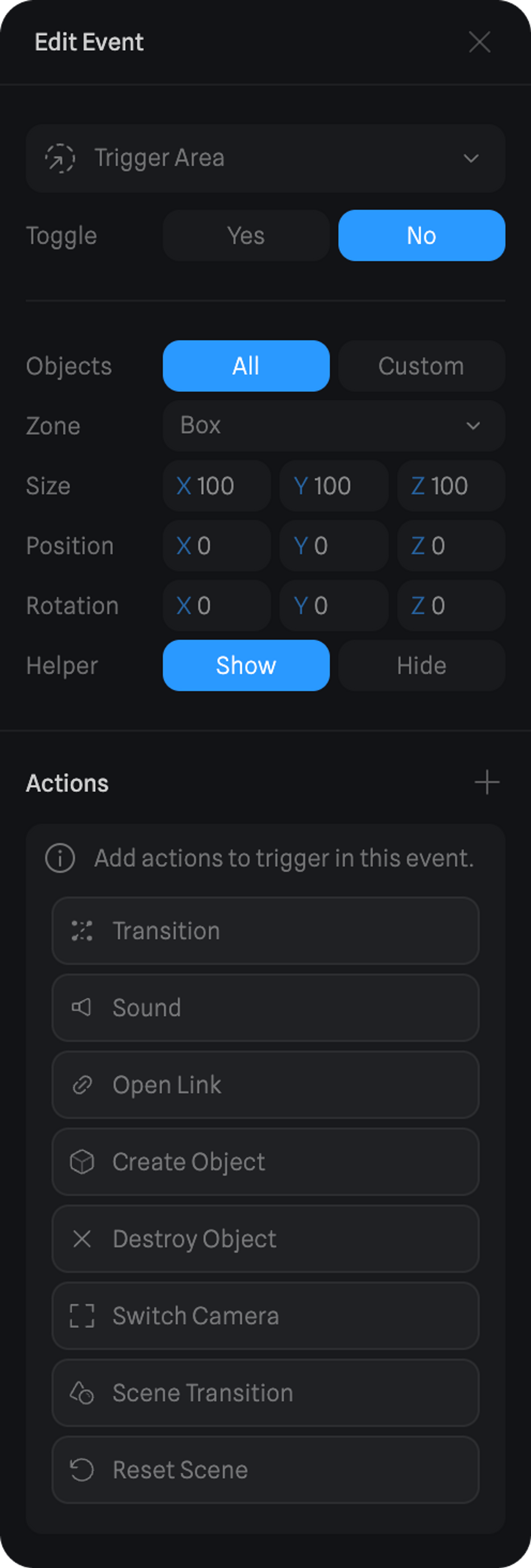
A Trigger Area Event will trigger the actions as soon as any object or a specific object gets inside a defined area.
***
### Settings for Trigger Event
**Toggle Property**
* The Toggle option means that when the event is first triggered, the actions go one way and when it's triggered again the actions come back, creating a toggle effect.
**Objects**
* All → every object will be considered for the Trigger Area detection.
* Custom → choose a specific object to be considered for the Trigger Area detection.
**Zone**
* The type of area. It can be a box or a sphere.
**Transform** (Size, Position & Rotation)
* Define the transform values for the trigger area.
**Helper**
* Show or hide the visualization of the trigger area in the editor.
**Actions**
Here are the different Actions you can trigger with the Trigger Area Event:
* [Transition Action](/interaction-states-events-and-actions/actions/transition-action)
* [Sound Action](/interaction-states-events-and-actions/actions/sound-action)
* [Open Link Action](/interaction-states-events-and-actions/actions/open-link-action)
* [Create Object Action](/interaction-states-events-and-actions/actions/create-object-action)
* [Destroy Object Action](/interaction-states-events-and-actions/actions/destroy-object-action)
* [Switch Camera Action](/interaction-states-events-and-actions/actions/switch-camera-action)
* [Scene Transition Action](/interaction-states-events-and-actions/actions/scene-transition-action)
* [Reset Scene Action](/interaction-states-events-and-actions/actions/reset-scene-action)
 ***
> *Try out teleporting via the Trigger Area event + Scene Transition action in the example above by walking into one of the teleports.*
***
> *Try out teleporting via the Trigger Area event + Scene Transition action in the example above by walking into one of the teleports.*