

Depth of Field (DoF)
Depth of Field (DoF) creates an effect where only objects within a specific distance from the camera are sharp and in focus, while those outside this range appear blurred. This technique focuses the viewer's attention on the subject of interest and adds realism by imitating how the eyes perceive depth.
How to enable Depth of Field (DoF)
To enable Depth of Field (DoF) in your scene, first deselect all objects to get the default sidebar on the right. Then under Scene, you’ll find the Effects panel where you can enable post-processing effects.
After enabling Effects, Depth of Field (DoF) will be the first option and can be enabled by pressing the eye icon.
Understanding Depth of Field (DoF)
To fully grasp Depth of Field, it's essential to familiarize yourself with its core elements. Find below, an explanation of the elements that shape depth of field.
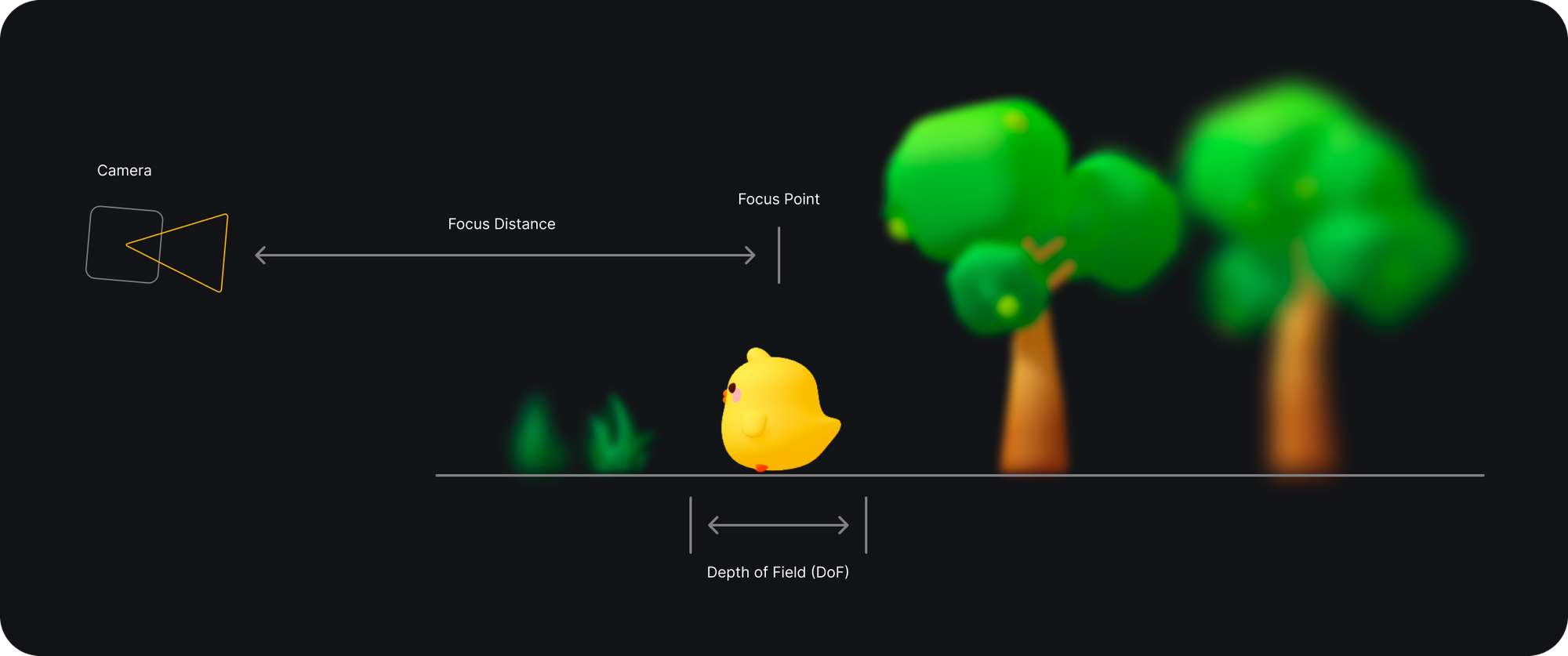
Focus Distance
Defines the position of the focus point and how far or close it is from the camera.
Use the focus point tool to define the focus point on the viewport.
Depth of Field (DoF)
Increases or decreases the focus range from the focus point.
Blur
Defines the blur intensity for everything outside the focus range.