Android Package (APK)
An APK (Android Package) is the traditional file format used to distribute and install Android apps. It contains all the necessary components packaged into a single file. Users can directly download and install APKs on their Android devices, making them the standard for app distribution outside of Google Play Store.
With Spline you can generate an APK of your 3D scene using our Vulkan-based renderer.
Our Vulkan-based renderer enables you to bring all of the interactivity from your 3D designs made in Spline to Android devices and take full advantage of their native performance.
Getting Started
Follow the steps below to get started generating and using APK files of your 3D scenes.
Platform Support
We recommend Android 10.0+
Spline is using the latest technologies to render 3D content on Android devices.
It runs on Phones, Tablets, Wear OS, Desktop, TV, and Automotive from Android 7.0 and up, but we recommend using Android 10.0+. Vulkan support is required.
Language and Libraries Support
The Spline Android Runtime can be used with Kotlin and Java.
Android Studio Simulator
The performance on the Android Studio simulator is not representative of the performance of the 3D scene on the final app running on physical devices. Depending on your development hardware, the Android simulator sometimes uses only the CPU (lower) or GPU (faster) for rendering graphics. However, the 3D scenes on your device will always use the GPU.
1. Generate an Android Package (APK) from Spline
- From the top toolbar, press the
Exportbutton to open the export panel; - Under Android Platform, select the
APKoption; - Fill in all the required settings to build your APK file. Refer below for more information;
- Press the Generate button.
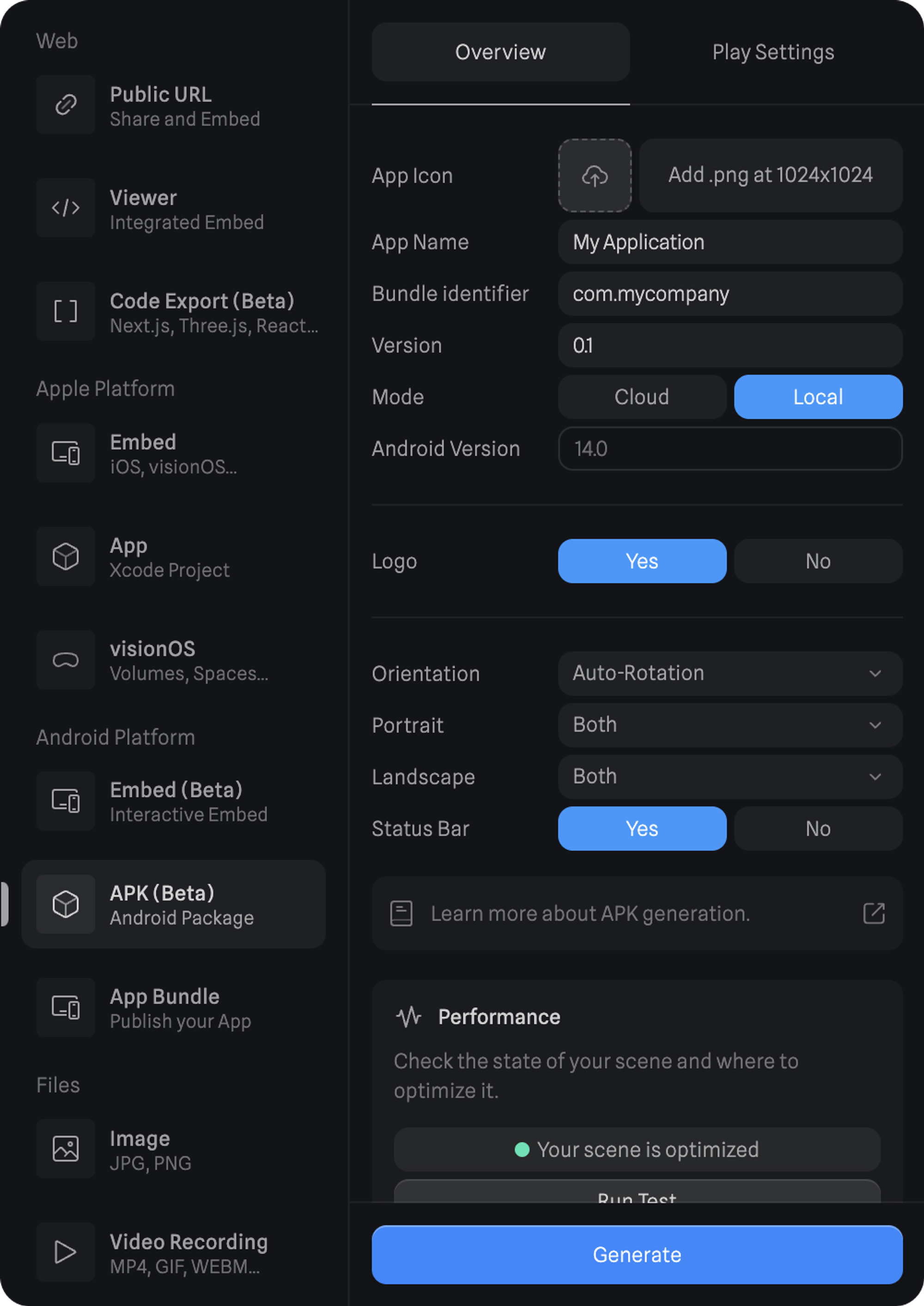
1.1 Settings Overview
Refer to the below for more information on all the different settings related to APK Generation.
| Setting | Purpose |
|---|---|
| App Icon | Upload a 1024x1024 image to use as your app icon. |
| App Name | The name of your app or project. |
| Bundle Identifier | Unique identifier for your Android app, which is used to distinguish it from all other apps on the Google Play Store and on devices. |
| Version | The version of your app. |
| Mode | The way your Spline scenes will be embedded. - Cloud will load the scene via URL. - Local will download and use a .splinecontent file. |
| Android version | The Android version the app will be compiled in. |
| Logo | Enable or disable the Spline logo. |
| Orientation | Define the orientation that your app will use. When in Auto-Rotation, you’ll be able to select which orientations your app can use. |
| Status Bar | Define if your app has the status bar visible or hidden. |
2. Install and launch the app on Android devices
You can bring your APK file into your physical Android device, install and run it by following these steps:
- Before you can install an APK file, you need to enable the option to install apps from unknown sources (this allows installation of apps from outside the Google Play Store);
- Bring the APK file to your Android device;
- Install the APK file by opening it;
- Once installed you can launch the app.
3. Publishing and distributing your app
For more information on publishing to the Google Play Store, refer to Android’s documentation on Publishing your app.
Feature Support Roadmap
Here is a list of each feature's current status. This list will be updated weekly until everything is fully supported.
| Feature | Status | Notes |
|---|---|---|
| Shapes | ✅ | Subdivs are baked. |
| Materials | ✅ | Cavity Layer, Dust Layer, Reflection Layer, and Video Layer are not supported yet. |
| Events & States | ✅ | AI Assistant Events are not supported yet. |
| Physics | ✅ | |
| Game Controls | ✅ | |
| Variables | ✅ | |
| Post-Processing | ✅ | |
| Particles | ✅ | |
| Animated Models | ✅ | |
| Multi Scenes | ✅ | |
| Shape Blend | ✅ | |
| Timeline Animations | ✅ | |
| Align to Path | ✅ | |
| Decals | 🚧 | |
| Hair | 🚧 |
Native 3D Embeds for Android
With our Vulkan-based renderer, you can now embed native 3D content in your Android projects
Learn more about Native 3D Embeds for Android.
Generate an AAB
Export your 3D content for Android devices by generating a pre-built Android App Bundle file (AAB) directly from Spline.
Learn more about Android App Bundles (AAB).